Are you in the situation where your .3gp video file is corrupted, incomplete, or unplayable? If so, then don’t fret, you are on the correct webpage. This article describes why your 3GP files turn corrupt and how to repair 3GP files in no time with less effort.
So, let’s get started…
To repair 3GP files, we recommend this tool:
This software will repair flickery, stuttery, jerky, unplayable videos and supports all popular video formats. Now repair your corrupt and broken videos in 3 easy steps:
- Try this Video Repair Tool rated Great on Pcmag.com.
- Click Add File to add the video you want to repair.
- Select Repair to start the repair process and save the repaired video on the desired location after the repair is done.
Why Did My .3gp Video File Get Corrupted?
3GP file corruption can be caused by various unforeseen reasons, including interrupted recordings or transfers (such as power loss or unplugging), hardware failures (including faulty drives, cables, or RAM), software problems (such as glitches, compression errors, or incompatible codecs), malware, or system crashes.
Best Tool To Repair 3GP Files
When it comes to fixing 3GP files, using the 3GP File Repair Tool is the best option you can try. This video repair tool has the ability to fix any kind of error related to the 3GP file. You can try this tool on both the operating systems, Windows as well as Mac OS. The user interface of this repair tool is so easy that anyone, even with zero technical knowledge, can try this tool.
This tool has several features and is able to:
- Fix corrupted, damaged, inaccessible, or broken 3GP files
- Apart from 3GP, it also fixes other video file formats like 3G2, MP4, WMV, FLV, M4V, MTS, AVCHD, F4V, etc
- Completely trustworthy tool
- Fixes virus-infected video file formats
- Friendly user-interface
- 100% safe & secure to use


* Free version of this program only previews repaired videos.
Below, you can go through the step by step guide to know how to repair 3GP files in no time.
Steps to Repair 3GP Files Easily
Step 1: Download, install and launch Video Repair software on your system. Click on 'Add Files' to add corrupted video files.
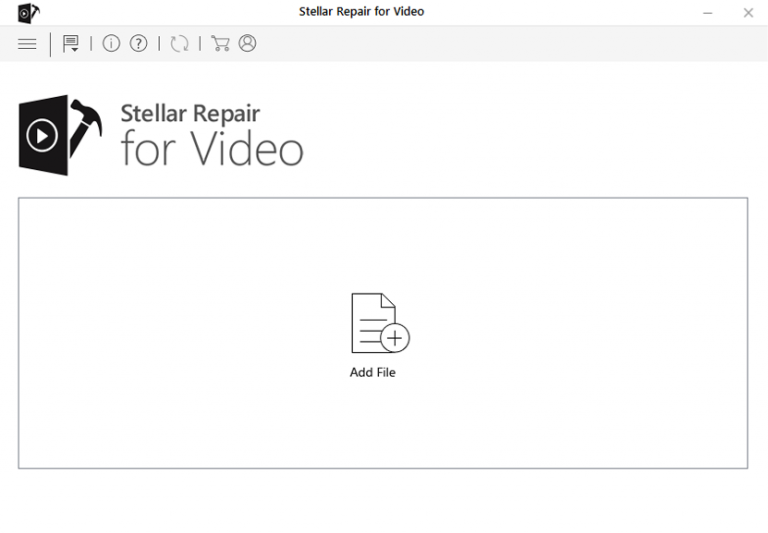
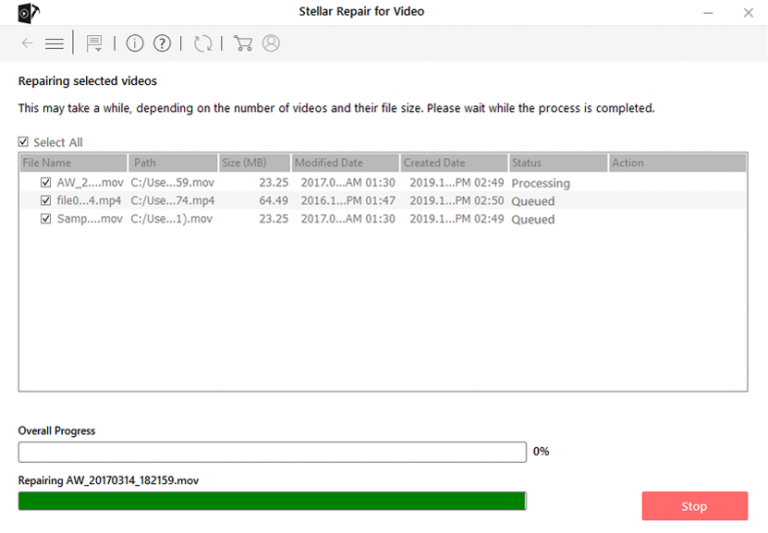
Step 2: Click on 'Repair' button to begin the repairing process. This start repairing your added video files one by one.
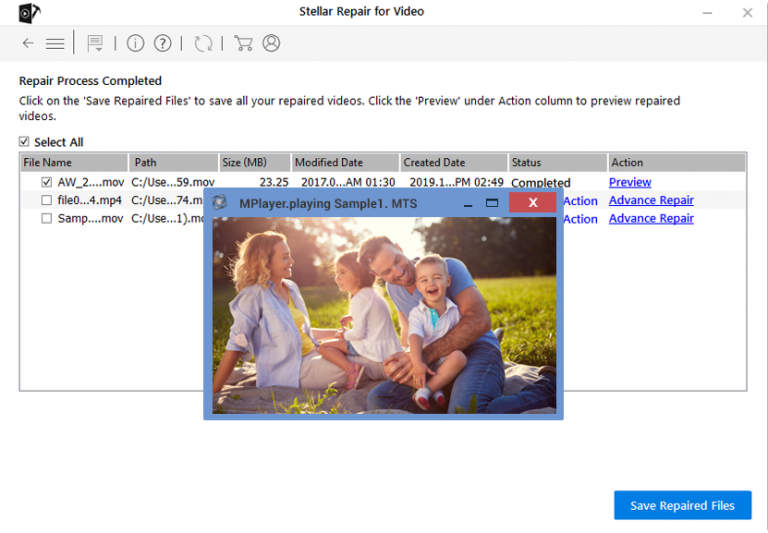
Step 3: You can click on 'Preview', in order to preview the repaired video file within the software and click on 'Save Repaired Files' button to save the repaired videos at desired location.
Other Alternatives For 3GP File Repair
Fix 1- Download the Video Again
Incomplete downloading or file transfer can cause .3gp video not to play properly. So, it is better to re-download or transfer the video from the source to the chosen destination.
Even after doing so, if you’re still facing the same issue, proceed to the next solution.
Also Read: How to Repair Corrupt DJI Video Files Successfully?
Fix 2- Convert 3GP Files to Different File Format Online
Try converting the video format to another format like MP4 or MOV that is actually compatible with the video media players. It is very helpful when the media player you are using actually does not support 3GP video files.
To convert the 3gp & repair 3GP files:
- Go to a website like CloudConvert, or FreeConvert.
- Next, click “Select File” or drag and drop your MP4 file.
- Choose “MOV” or “MP4” as the output format.
- Now, click “Convert,” wait for it to finish, and then download your new MOV file.
Fix 3- Use VLC Media Player To Fix 3GP Video Files
Sometimes, it is possible that the media player you are using may not have the 3GP supported codecs, so you can try playing the 3GP file on the VLC Media Player. The best thing about VLC media player is that it is actually an open-source program and it can play about any video file format. This media player supports multiple platforms like Windows iOS, Android and Linux.
You can also use the VLC media player to convert unplayable 3GP files to MP4 or AVI video file format. Follow the below steps to do so:
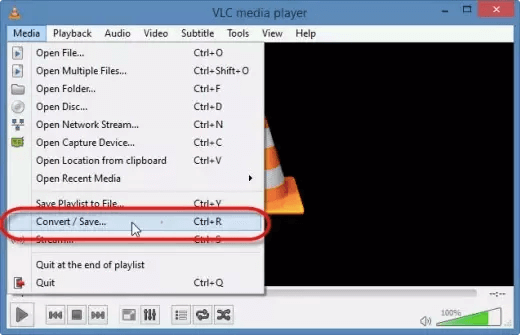
- First of all, you have to launch the VLC Media Player and then click on Media and then Convert or Save.
- Next, you have to click Add option to insert 3GP video files.
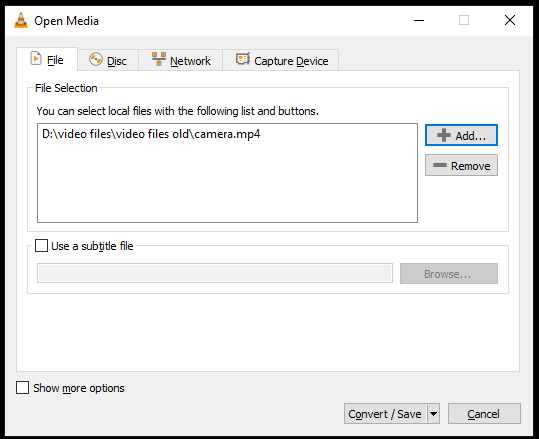
- After this, you have to click Convert/Save and then in the Convert window, you can provide the file name and the location to save the 3GP video file.
You can then select the desired input codec from the list of Profile, and then you have to click Start option in the Convert window.
Fix 4- Download the Right Codec
Another solution you can try to repair 3GP video, you get the right codec to play the 3GP video files on the mobile computer or phone. The absence of the right codec can be the major reason why you are not able to play the 3GP video files. A codec used to compress or decompress 3GP video files. The media player codec used to support the 3GP video file format is available online.
Frequently Asked Questions
What is 3GP Video Quality?
3GP video quality is usually low to medium, categorized by low resolutions (like 176x144 or 320x240), small file sizes, and basic compression, making it ideal for older 3G mobiles.
Can I Convert a 3GP File?
To convert 3GP video file to another video format, follow the below step by step guide:
- Go to any online video converter site, upload the 3GP file by simply selecting or drag & drop.
- Then, you have to click on Convert the file. Select the output video format (MP4).
- This action will start converting the video to MP4 video file format.
- After this, once the file is converted, you can download it from your device and enjoy watching the video.
Why Is My 3GP File Not Opening?
A 3GP file can get damaged due to incomplete file transfer or a infected storage system.
How Do I Play 3GP Files on Android?
When it comes to play 3GP video files on Android, you can go to Google Play Store on Android and search for the app ‘VLC for android’ and then download and install it. You can then open and provide access permissions. And, at last, you can enjoy watching the video. Or, you can also download such an app from its official site as well.
Final Verdict
3GP video file format is commonly used but due to some unintentional actions, your file may get corrupted or damaged. However, now there is no need to worry because I have already mentioned the best ways for a 3GP file repair solution.
Yes, using 3GP File Repair Tool, you will be able to repair 3GP video files that have been corrupted or damaged for some reason. Or, apart from that, you can also try the other manuals I have mentioned above if you want to give a try to the repair tool.
Or, in case, if you have lost your 3GP video file, then you can try to recover the 3GP video file using the backup option, restore from the Recycle Bin, or the attrib command which is used to show the hidden 3GP files in the storage media.
So, the choice is all yours….
References –


Taposhi is an expert technical writer with 5+ years of experience. Her in-depth knowledge about data recovery and fascination to explore new DIY tools & technologies have helped many. She has a great interest in photography and loves to share photography tips and tricks with others.